Catalog data model and lifecycle
All the business data of RS-Python (CADIP sessions, auxiliary files, Level-0, Level-1 and Level-2 products) is described with the SpatioTemporal Asset Catalog (STAC) specification, version 1.1.0. This page describes the STAC fields used for the data, both the static ones (set once) and the dynamic ones, that evolve during the data lifecycle.
Data model
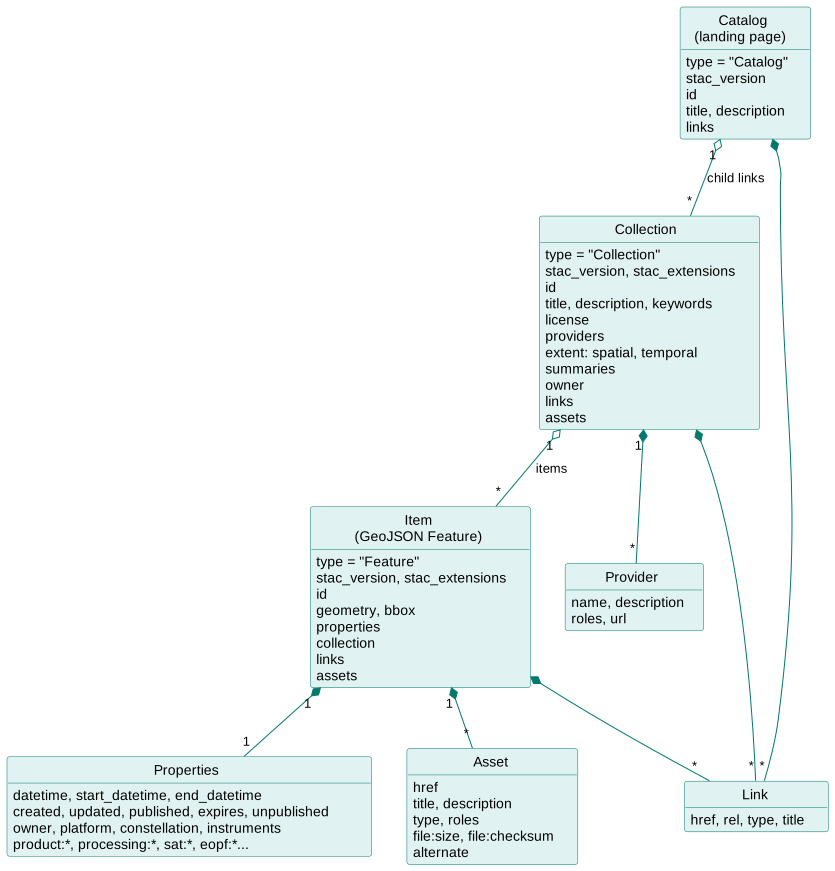
- The landing page of the catalog is a STAC Catalog, that links to the Collections you can read.
- Each collection belongs to an owner (see Collections and ownership) and contains Items.
- Each item is a GeoJSON Feature that describes a product: its footprint (
geometry,bbox), its metadata (properties) and its files (assets), stored in the S3 object storage.
The fields are defined by the STAC specification:
| Object | Specification |
|---|---|
| Catalog | Catalog fields |
| Collection | Collection fields, including the providers and the spatial and temporal extents |
| Item | Item fields and common metadata (title, description, license, platform, constellation, instruments, gsd...) |
| Asset | Asset fields (href, title, type, roles...) |
Extensions
The items also use fields from the following STAC extensions:
| Extension | Prefix | Description |
|---|---|---|
| Product | product: |
Product type (mandatory in the catalog, e.g. S03OLCEFR), timeliness. |
| Processing | processing: |
Processing level, facility, software version, date and lineage of the product. |
| Satellite | sat: |
Orbit numbers and state, acquisition station. |
| SAR | sar: |
Instrument mode, polarisations... of the Sentinel-1 products. |
| Electro-Optical | eo: |
Bands, cloud and snow cover of the optical products. |
| Projection | proj: |
Coordinate reference system and grid of the products. |
| Raster | raster: |
Raster bands of the assets. |
| EOPF | eopf: |
Fields specific to the EOPF products, e.g. eopf:datatake_id, eopf:origin_datetime. |
| File | file: |
Size and checksum of the assets. The checksum is always an MD5 multihash, see Add an item. |
| Timestamps | published, expires, unpublished dates, see Data lifecycle. |
|
| External IDs | externalIds of the items and assets: their identifiers in other systems, e.g. the OData Id in the external data sources, see STAC mapping, or the UUID of the OData PRIP interface. |
|
| Alternate Assets | Alternate locations of an asset, e.g. its download URL. | |
| Authentication | auth: |
How to authenticate to get the assets. |
| Ownership (RS-Python) | owner of the collections and items. |
|
| CADIP (RS-Python) | cadip: |
Metadata of the CADIP sessions and files, see STAC mapping. |
The products generated by the DPR processors may contain fields of other extensions, as written by the processors.
The list of the extensions declared by the catalog is configured at deployment time (rs_server_catalog.extensions
inventory variable).
Data lifecycle
Item lifecycle
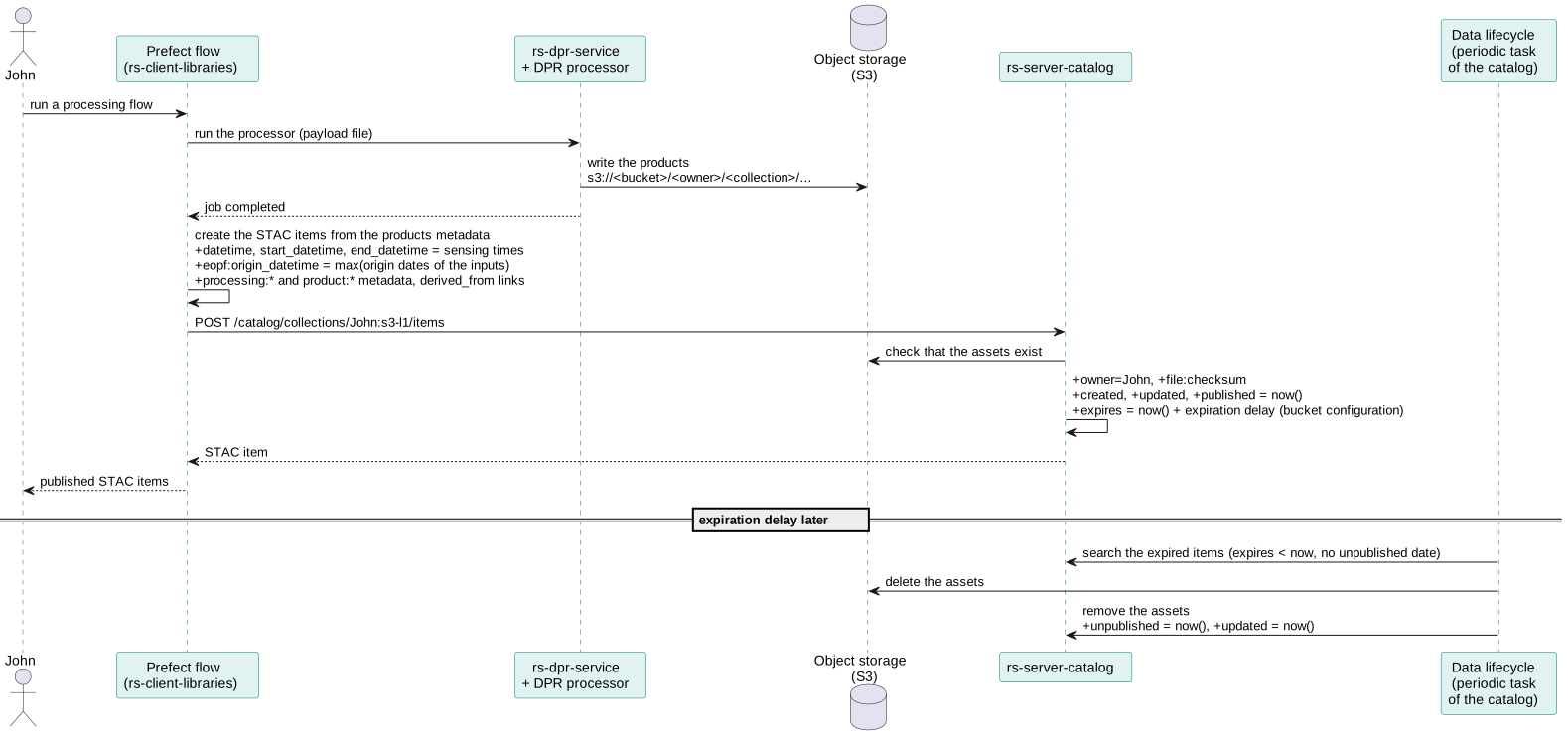
The lifecycle of the items is handled with these dynamic fields:
| Field | Meaning | CADIP sessions | AUXIP auxiliary files | S1, S2, S3 products |
|---|---|---|---|---|
start_datetime |
Data capture start | DownlinkStart of the session |
Validity start (ContentDate/Start) |
Sensing start, written by the processor |
datetime |
Data capture, by ESA convention the start | PublicationDate of the session |
Validity start | Sensing start |
end_datetime |
Data capture end | DownlinkStop of the session |
Validity end (ContentDate/End) |
Sensing stop |
eopf:origin_datetime |
Availability of the product at its source | PublicationDate |
For the generated products, the most recent origin date of the input products, set by the processing flows | |
processing:datetime |
Processing date | processingDate |
Set by the processor | |
created |
First insertion in the catalog | Set by the catalog | Set by the catalog | Set by the catalog |
updated |
Last modification in the catalog | Set by the catalog | Set by the catalog | Set by the catalog |
published |
Publication in the catalog | Set by the catalog | Set by the catalog | Set by the catalog |
expires |
Data valid until | Set by the catalog: insertion date + expiration delay | idem | idem |
unpublished |
Data removed (assets deleted) | Set by the catalog data lifecycle task | idem | idem |
All the dates are formatted according to RFC 3339. When these fields are set in the item properties, they refer to the metadata (e.g. when the STAC item was published); when they are set in an asset, they refer to the file itself.
Expiration and deletion
The expiration delay of an item is given by the bucket configuration, according to its owner, collection and product type. It allows e.g. to keep the auxiliary files much longer than the intermediate products.
The catalog runs a periodic task (RSPY_DATA_LIFECYCLE_PERIOD) that, for each item whose expires date is passed
and that is not unpublished yet:
- deletes its assets from the object storage,
- removes the assets from the item,
- sets its
unpublishedandupdateddates to the current date.
The item metadata is kept in the catalog, so the history of the production is not lost. An unpublished item can be published again by staging or generating it again.
Staging lifecycle
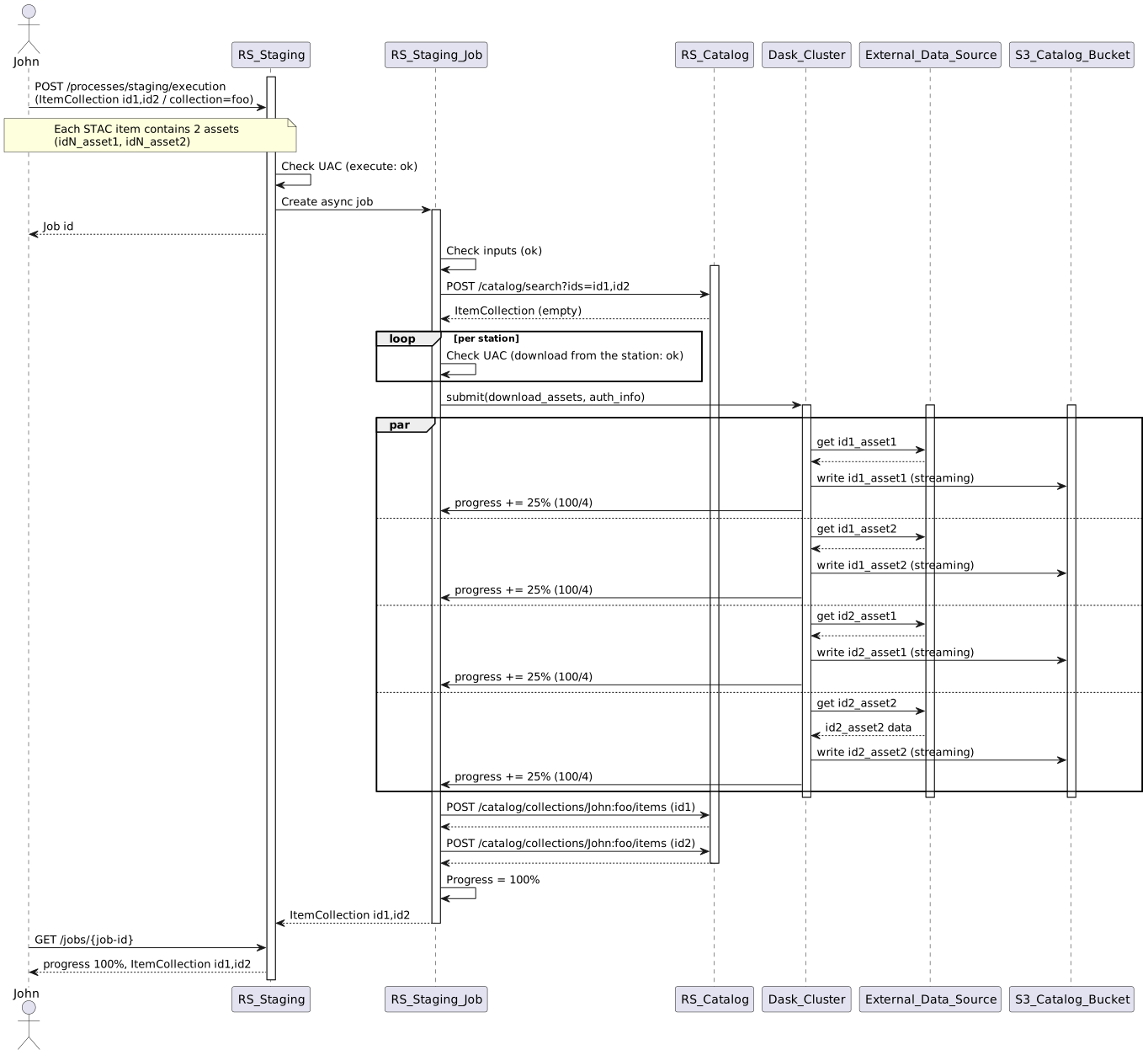
The items of the external data sources enter the catalog through the staging: