Deploy RS-Python
RS-Python has two deployment targets:
- the cluster mode, the nominal mode, where all the components are deployed on a Kubernetes cluster. This page describes it.
- the local mode, used by the developers to run the services, a Jupyter server and the station mockups on their own computer with Docker Compose, without authentication. See Local mode.
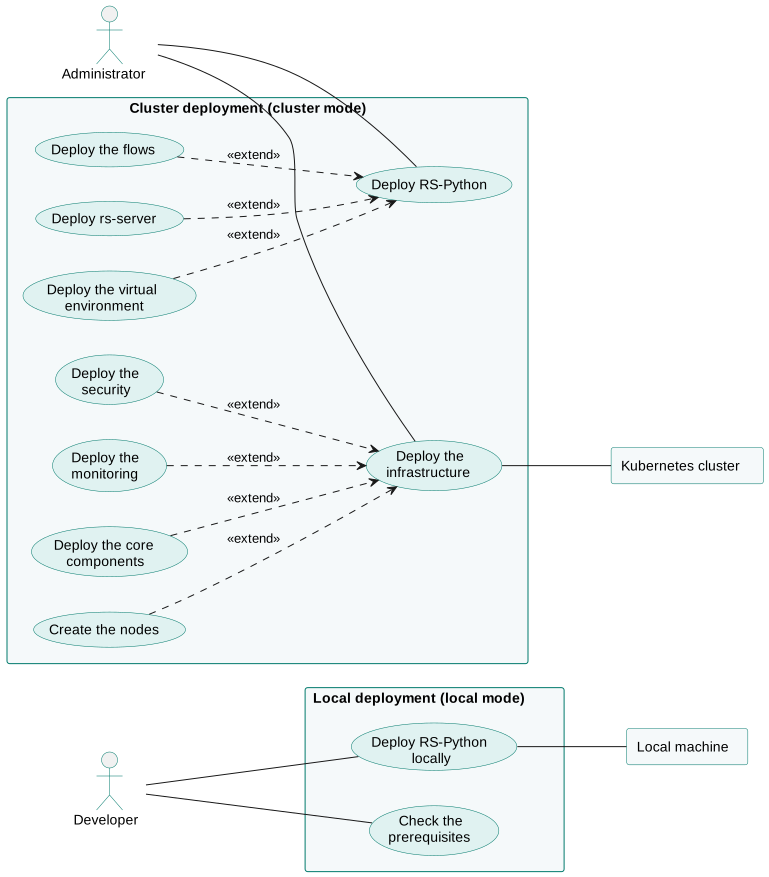
Overview
The cluster deployment is made of layers, each one implemented by a GitHub repository and deployed on top of the previous ones:
flowchart BT
    core["<b>rs-infra-core</b><br/>Kubernetes cluster (Terraform), networking (Envoy Gateway),<br/>certificates, IAM (Keycloak), databases (CloudNativePG), backups (Velero)..."]
    security["<b>Security</b><br/>(non-public repository)"]
    monitoring["<b>rs-infra-monitoring</b><br/>Grafana, Prometheus, Loki, Tempo, Alloy"]
    env["<b>rs-workflow-env</b><br/>JupyterHub, Prefect server and workers,<br/>Dask Gateway, API Key Manager"]
    server["<b>rs-server-deployment</b> (Helm charts from <b>rs-helm</b>)<br/>rs-server services, rs-dpr-service, STAC browsers,<br/>pgstac database, staging Dask cluster, mockups"]
    flows["<b>rs-workflow-deployment</b><br/>Prefect deployments and automations"]
    core --> security
    core --> monitoring
    core --> env
    env --> server
    server --> flows
All the layers are deployed with the same mechanism, provided by the apps.yaml
Ansible playbook of rs-infra-core:
- each repository contains an
apps/folder (a package), made of one sub-folder per application, - each application folder contains a Kustomize
kustomization.yamlfile, that can reference Helm charts (e.g. from rs-helm) and Kubernetes manifests, - all the files are Jinja2 templates, rendered with the variables of your inventory (domain name, credentials, sizing...),
- the applications are deployed in the alphabetical order of their folder names: the
NN-prefix of the folder names gives the deployment order (e.g.00-namespaces,01-cert-manager...), - the playbook waits for the deployed resources to be ready before deploying the next application.
# Deploy all the applications of a package
ansible-playbook apps.yaml -i inventory/mycluster/hosts.yaml -e '{"package_paths": ["~/rs-workflow-env/apps/"]}'

# Deploy (or redeploy) a single application of a package, e.g. "jupyterhub"
ansible-playbook apps.yaml -i inventory/mycluster/hosts.yaml -e '{"package_paths": ["~/rs-workflow-env/apps/"]}' -e app=jupyterhub
The inventory, that contains the configuration and the credentials of your platform, is specific to each platform: keep it in a private repository or in a secret manager (see Credentials).
Deployment steps
| Step | Repository | Documentation |
|---|---|---|
| 1. Create the Kubernetes cluster and deploy the core infrastructure | rs-infra-core | Infrastructure installation |
| 2. Deploy the monitoring | rs-infra-monitoring | rs-infra-monitoring |
| 3. Deploy the security components (Wazuh, NeuVector) | non-public repository | |
| 4. Deploy the virtual environment | rs-workflow-env | rs-workflow-env |
| 5. Deploy the RS-Python services | rs-server-deployment, rs-helm | rs-server-deployment, rs-helm |
| 6. Deploy the Prefect flows | rs-workflow-deployment | rs-workflow-deployment |
| 7. Create the user accounts and initialise the processing environment | Create accounts and assign permissions, Initialise the processing environment |
The deployment on the cluster is organised in node pools, so that each kind of workload runs on dedicated nodes:
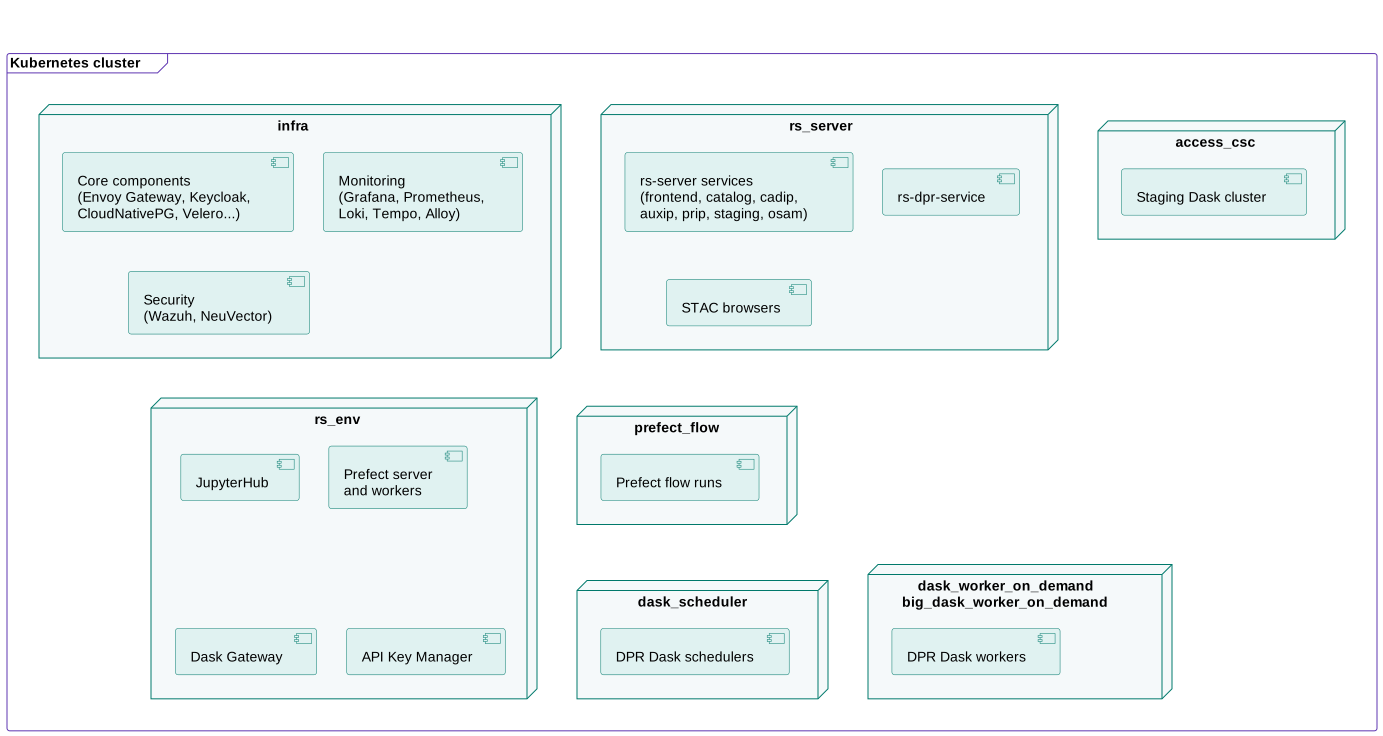
| Node pool | Workloads |
|---|---|
infra |
Core, monitoring and security components. |
rs_server |
The rs-server web services, rs-dpr-service and the STAC browsers. |
access_csc |
The components that access the Copernicus Space Component (CSC) external data sources, e.g. the staging Dask cluster. |
rs_env |
The virtual environment: JupyterHub, Prefect server and workers, Dask Gateway, API Key Manager. |
prefect_flow |
The Prefect flow runs. |
dask_scheduler |
The schedulers of the Dask clusters that run the DPR processors. |
dask_worker_on_demand, big_dask_worker_on_demand |
The workers of the Dask clusters that run the DPR processors, with standard or big resources. |
The pods are assigned to the node pools with the node-role.kubernetes.io/<node-pool> node labels.
The node pools, their sizing and their autoscaling are defined in the cluster.tfvars file of your inventory. See also
Isolation between user groups to deploy several
virtual environments on the same cluster.