rs-server
rs-server is the central service of the RS-Python platform. It exposes the core functionalities through a unified REST API, protected by authentication and fine-grained authorisation. It:
- provides access to the external data sources: the Copernicus acquisition stations (CADIP), auxiliary data (AUXIP) and production services (PRIP), see External data sources,
- provides a catalog of the products, see Catalog,
- stages the products of the external data sources into the catalog, see Staging,
- manages the object storage accounts and access rights of the users, see OSAM,
- aggregates the documentation of all these services in a single Swagger page, see Frontend.
The processing of the products is provided by a separate service, rs-dpr-service, that is not part of this repository because it uses different Python and Dask versions.
| Source code | https://github.com/RS-PYTHON/rs-server |
| Swagger page | https://rspy.ops.rs-python.eu/docs on the reference platform |
| Python API documentation | rs_server_* modules in the Python API documentation |
| Deployment | Helm charts, rs-server-deployment |
| Developer manual | Developer manual |
STAC everywhere
All the data is described with the SpatioTemporal Asset Catalog (STAC) specification, and searched with the STAC API: the data of the external data sources, that rs-server translates from OData to STAC, and the data of the catalog. The same language is used at each step of a processing workflow:
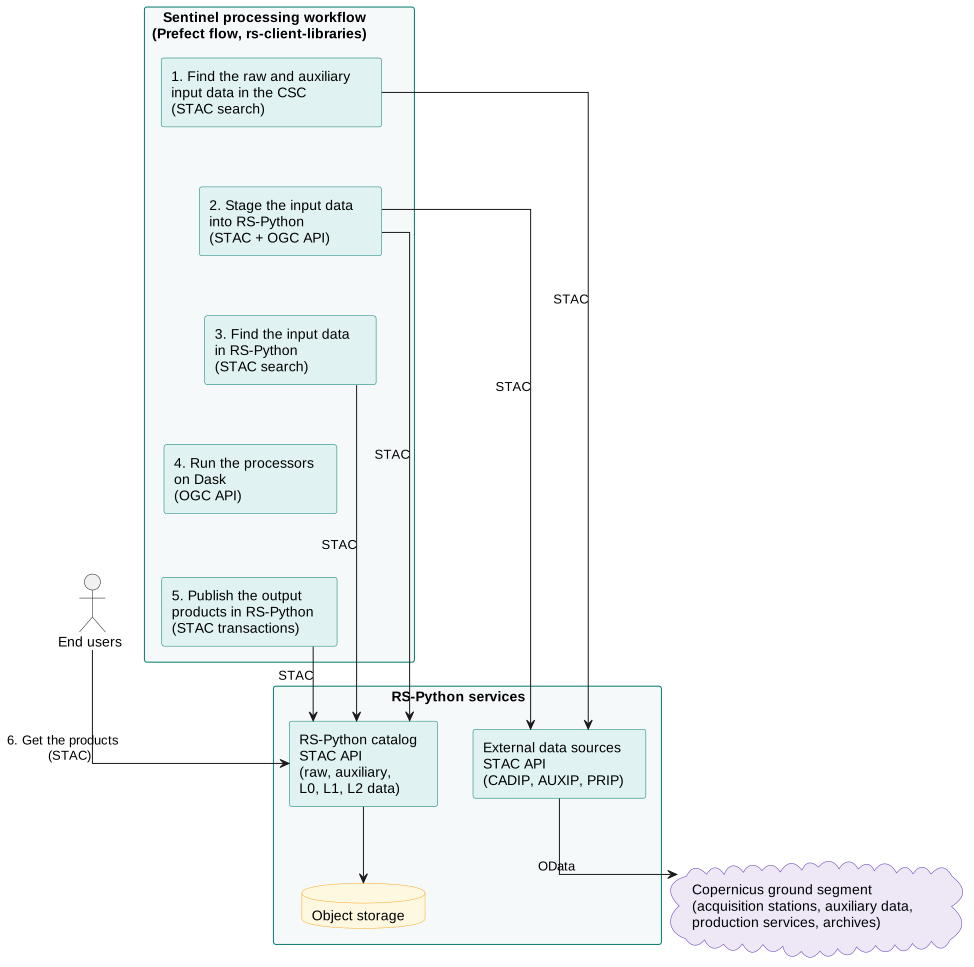
Using STAC brings several advantages:
- Interoperability: STAC is an open, widely adopted standard, also used by the Copernicus Data Space Ecosystem and by the EOPF products. RS-Python data is compatible with many external tools, libraries and platforms, see the STAC ecosystem.
- Uniform data model: all the datasets, internal or external, are described with the same structure, which simplifies their discovery and integration.
- Efficient search: STAC provides powerful spatial, temporal and metadata-based search capabilities, with CQL2 filters.
- Easier integration: developers use existing STAC clients and tools, e.g. pystac-client or STAC Browser, instead of building custom parsers or interfaces.
- Scalability: STAC is designed to handle large catalogs and distributed data sources.
The asynchronous services (staging, processing) follow the OGC API - Processes
standard: a process is started with a POST /processes/{process}/execution request, that returns a job identifier,
and the job is followed with GET /jobs/{job_id}.
Architecture
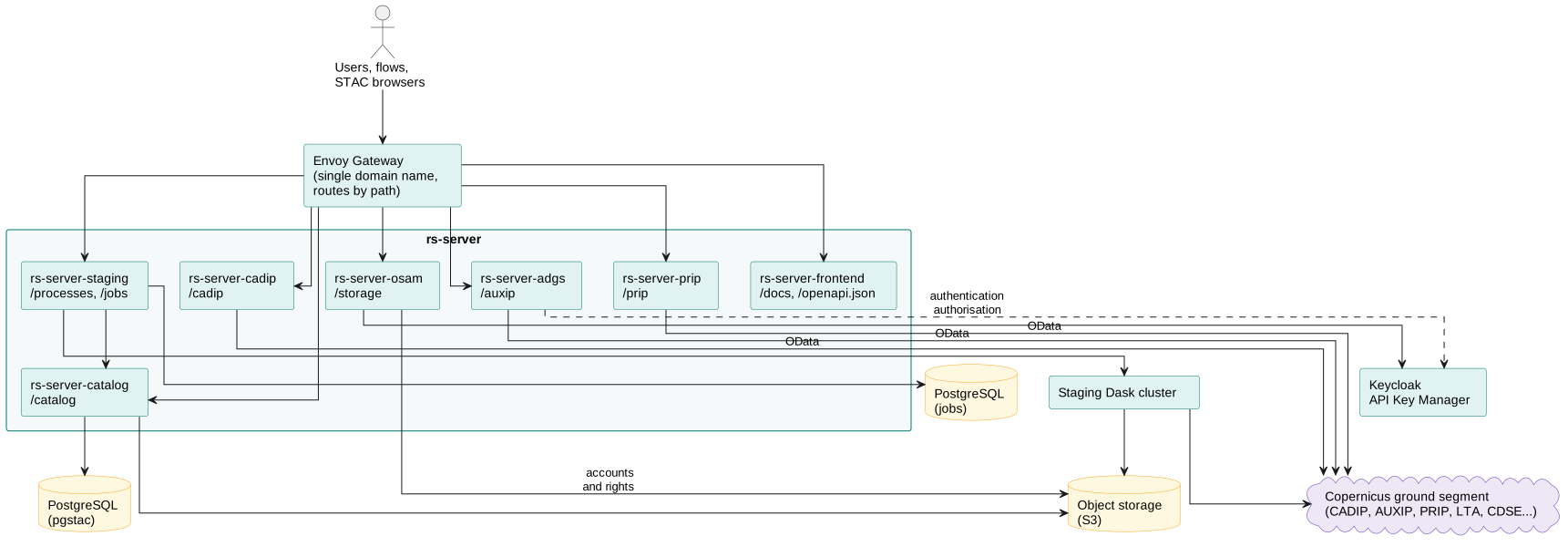
rs-server is made of independent web services, implemented with FastAPI, each one packaged in its own Docker image and deployed with its own Helm chart:
| Service | Endpoints | Implementation |
|---|---|---|
rs-server-adgs |
/auxip |
STAC API over the AUXIP instances (ADGS). |
rs-server-cadip |
/cadip |
STAC API over the CADIP stations. |
rs-server-prip |
/prip |
STAC API over the PRIP instances. |
rs-server-catalog |
/catalog |
stac-fastapi-pgstac with a pgstac database, wrapped by RS-Python middlewares for the ownership, the authorisation, the object storage and the data lifecycle. |
rs-server-staging |
/processes, /jobs |
pygeoapi process manager, with the staging tasks run on a Dask cluster. |
rs-server-osam |
/storage |
Object storage accounts and rights management. |
rs-server-frontend |
/docs, /openapi.json |
Aggregated Swagger page. |
The services are stateless and scale horizontally. They are exposed behind a single domain name by the
Envoy Gateway of the cluster, that routes the requests by path. They share the
rs_server_common package: authentication and authorisation, STAC API common implementation, OData to STAC
mapping, S3 access, logging and OpenTelemetry instrumentation.
rs-server runs in two modes:
- cluster mode, on a Kubernetes cluster, with authentication: each request must carry a Keycloak OAuth2 session cookie or an API key, and the user must have the required Keycloak roles,
- local mode, with Docker Compose, without authentication, for development purposes, see the local mode.
User documentation
- External data sources and their STAC mapping
- Catalog, its data model and lifecycle and its OData PRIP interface
- Staging
- OSAM
- Frontend