Customise the DPR processing
All the DPR processors are run by the generic processing flow, process-generic: a Prefect flow able to
generate Copernicus products from any DPR processor, with no code specific to a mission or a processing level. The
mission flows (e.g. process-s3-l0, process-s3-l1-olci-ondemand) only compute its inputs, and call it with the
default settings of their processing.
This page describes the parameters of process-generic, the default settings of the processing flows, and the
storage configuration. How the payload of the processor is built from these parameters is described in
Task tables and payload file, and how the processor is run in
DPR processors.
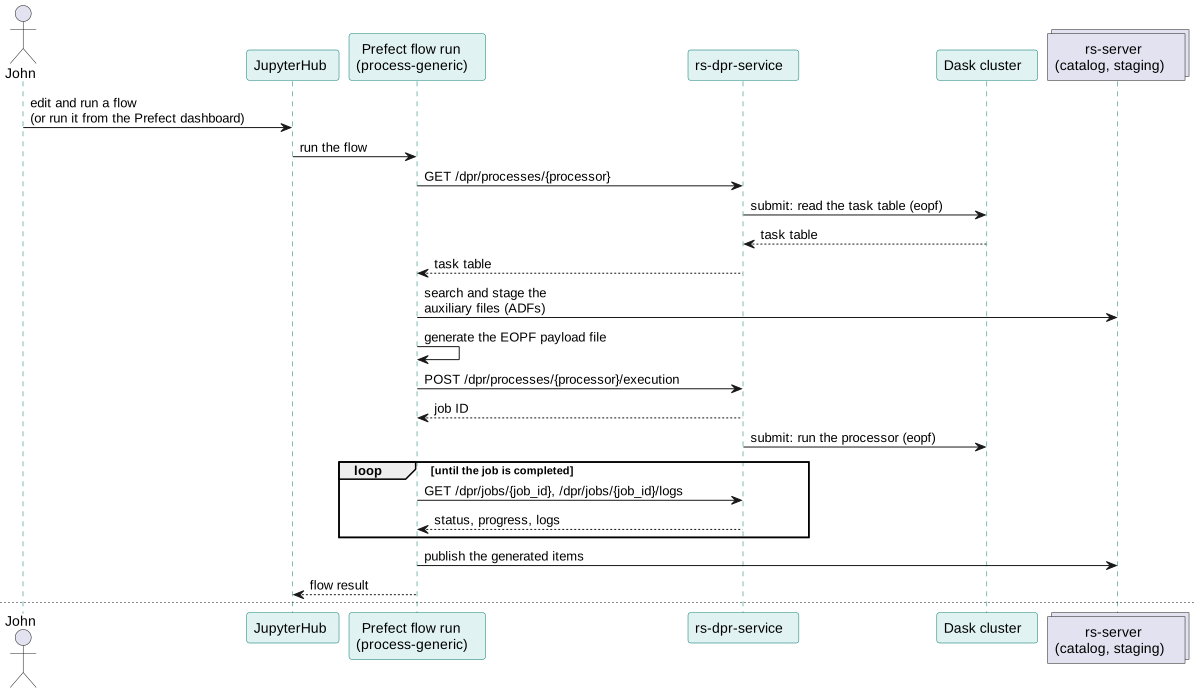
Parameters of process-generic
The flow takes a dpr_input parameter (DprProcessIn) and an optional retry_config (staging_retries,
staging_retry_delay: retries of the staging of the auxiliary files).
| Parameter | Mandatory | Description |
|---|---|---|
env |
Yes | Flow environment, see Prefect flows. The owner_id is the owner of the generated products and of the API key used. |
processor_name |
Yes | Name of the processor, as a process of rs-dpr-service: s1_l0, s3_l0, s1_ard, s3_l1olci, s3_l2olci... |
processor_version |
Yes | Version of the processor (informative, used for the performance indicators). |
pipeline or unit |
One of them | Name of the pipeline of the task table to run (usual case), or of a single unit (advanced use). |
dask_cluster_label |
Yes | Label of the Dask cluster where the processor runs, see Dask. |
dask_cluster_instance |
No | Identifier of a specific Dask cluster instance, used to log the direct URL of its dashboard. |
s3_payload_file |
Yes | S3 path where the payload file is written (deleted after the run). |
input_products |
Yes | The input products: list of {name, item_id, collection_name}, where name is the input name in the task table, and item_id and collection_name identify the STAC item in the catalog. |
generated_product_to_collection_identifier |
Yes | Where to publish the generated products, see Generated products. |
auxiliary_product_to_collection_identifier |
Yes | Where to find and stage the auxiliary files, see Auxiliary files. |
processing_mode |
No | Processing modes, used to filter the inputs and ADFs of the task table: nrt, ntc, reprocessing, subs. always is always applied. |
workflow_type |
No | on-demand (default), systematic or benchmarking. |
priority |
No | low (default), medium or high: priority of the tasks in the Dask cluster. |
start_datetime, end_datetime |
No | Time interval used to find the auxiliary files, usually the sensing start and stop of the input products. For the Level-0 processing, the input is a session without sensing dates: its publication date is used for both. |
satellite |
No | Satellite, e.g. sentinel-3a, used by the queries that depend on the satellite. |
reference_date, instrument_mode |
No | Other external variables, used by some task tables. |
edh_api_key |
No | EarthDataHub API key, to read the Copernicus DEM. |
temporary_folder, temporary_shared, dask_task_timeout |
No | Advanced options of the processor run. |
The logging level of the processor is given by env.logging_level.
Generated products
generated_product_to_collection_identifier is a list of mappings:
[
  {"name": "S03OLCEFR", "product_type": "S03OLCEFR", "collection_name": "s03olcefr"},
  {"name": "S03OLCERR", "product_type": "S03OLCERR"},
  {"name": "S03ISPS", "product_type": "*", "collection_name": "s3-l0"}
]
nameis the name of the output in the task table,- if
collection_nameis not given, the collection is named after the product type, product_typecan be*: all the product types are mapped to the same collection, which is then mandatory,- the list can contain more elements than the outputs of the task table, so the same mapping can be used for several pipelines.
Auxiliary files
auxiliary_product_to_collection_identifier is a list of mappings that give, for each auxiliary product type, where
to search the files (source) and in which catalog collection to stage them:
[
  {"product_type": "AX___FRO_AX", "collection_name": "s03-aux-fro"},
  {"product_type": "ADF_OLCAL", "collection_name": "adf-olci", "source": "catalog"},
  {"product_type": "*", "collection_name": "s03-aux"}
]
sourceisauxip(default),catalog,prip,cadip,cdseorearthdatahub. Withcatalog, the files are already in the catalog (e.g. ADFs converted to Zarr by the conversion flows) and are not staged again,product_typecan be*for all the other product types,- if a product type is not mapped and there is no
*, the collection<satellite>-aux-<product_type>is used with theauxipsource, selected_assets(optional) stages only some assets of the items,- the list can contain more elements than the ADFs of the task table.
Default settings of the processing flows
The processing flows read the parameters of their processor from the <processing_id>-default-setting
Prefect variable of their processing:
| Processing | Flows | Prefect variable |
|---|---|---|
| Sentinel-1 Level-0 | process-l0, process-s1-l0 |
s1l0-default-setting |
| Sentinel-1 ARD | process-s1-ard-reference, process-s1-ard |
s1ard-default-setting |
| Sentinel-3 Level-0 | process-l0, process-s3-l0 |
s3l0-default-setting |
| Sentinel-3 OLCI Level-1 | process-s3-l1-olci-ondemand, process-s3-l1-olci-systematic |
s3l1olci-default-setting |
| Sentinel-3 OLCI Level-2 | process-s3-l2-olci-ondemand, process-s3-l2-olci-systematic |
s3l2olci-default-setting |
These variables are checked against the ProcessorDefaultSettings.schema.json JSON schema:
| Field | Mandatory | Description |
|---|---|---|
processor |
Yes | name and version of the processor. |
pipeline or unit |
Yes (one of them) | The pipeline or the unit of the task table to run. |
priority |
Yes | low, medium or high. |
processing_mode |
Yes | List of processing modes, e.g. ["always"]. |
dask_cluster_name |
Yes | Label of the Dask cluster of the processor. |
auxiliary_product_to_collection_identifier |
Yes | ADFs to stage, see Auxiliary files. |
generated_product_to_collection_identifier |
Yes | Where to publish the generated products, see Generated products. |
input_collections |
For the Level-0 processings | Catalog collections where the flows search their input products: the staged sessions for the Level-0 processings, the SLCs for the Sentinel-1 ARD processing, where it is optional (default: s01sewslc, s01siwslc, s01ssmslc). |
cadip_collections |
For the Level-0 processings | Collections of the CADIP stations where a session absent from the catalog is searched, to stage it. |
For example, s3l1olci-default-setting:
{
  "processor": {"name": "s3_l1olci", "version": "<version>"},
  "pipeline": "ol1_eo",
  "priority": "low",
  "processing_mode": ["always"],
  "dask_cluster_name": "<dask cluster label>",
  "auxiliary_product_to_collection_identifier": [
    {"product_type": "AX___OSF_AX", "collection_name": "ax___osf_ax"}
  ],
  "generated_product_to_collection_identifier": [
    {"name": "S03OLCEFR", "product_type": "S03OLCEFR", "collection_name": "s03olcefr"}
  ]
}
and s3l0-default-setting:
{
  "processor": {"name": "s3_l0", "version": "<version>"},
  "pipeline": "s3_l0_full",
  "priority": "low",
  "processing_mode": ["always"],
  "dask_cluster_name": "<dask cluster label>",
  "input_collections": ["<collection of the staged sessions>"],
  "cadip_collections": ["<cadip collection>"],
  "auxiliary_product_to_collection_identifier": [],
  "generated_product_to_collection_identifier": [
    {"name": "S03OLCL0_", "product_type": "S03OLCL0_", "collection_name": "s03olcl0_"},
    {"name": "S03NATL0_", "product_type": "S03NATL0_", "collection_name": "s03natl0_"}
  ]
}
The flows read these settings first, and check that the Dask cluster of the processor and the dask-staging cluster
(which stages the auxiliary files) are running, before searching their inputs in the catalog or in the stations: a
configuration error or an unavailable Dask cluster is reported at once.
The settings are the same for all the runs of a processing. What changes for a run is given by the parameters of the
flows: the owner of the products (env_args), the input products, force_systematic, and the pipeline of
process-s1-ard.
After running the processor, the flows emit an event for each generated product, related to the workflow:
on-demand, or systematic for the systematic flows and the runs with force_systematic. Only the events of a
systematic workflow start the next processing, see Systematic processing.
Write a processing flow
A processing flow only contains what is specific to its processor: a function that computes the input products and
the external variables of the processor from the STAC item of the product to process, and runs the processor with
call_dpr_flow (the Sentinel-3 OLCI flows call it through process_olci(), that also requests the quicklooks). The
identifier of the processing is added to ProcessingId, and its settings to the <identifier>-default-setting
variable. The on-demand and systematic flows then only call the helpers of
rs_workflows.on_demand.common.product_processing, that read the settings before the product:
from functools import partial

from prefect import flow

from rs_workflows.flow_utils import FlowEnvArgs, FlowInputProduct
from rs_workflows.on_demand.common.product_processing import (
    FlowInputItem,
    process_catalog_product,
    process_event_product,
)
from rs_workflows.utils.dpr import ProcessingId, call_dpr_flow


async def process_my_product(env_args, settings, item_id, collection_name, properties, workflow, base_name="MY_INPUT"):
    """Run my processor on a product."""
    return await call_dpr_flow(
        env_args,
        settings,
        input_products=[FlowInputProduct(name=base_name, item_id=item_id, collection_name=collection_name)],
        external_variables={"start_datetime": properties["start_datetime"], "end_datetime": properties["end_datetime"]},
        workflow=workflow,
    )


@flow(name="process-my-product-ondemand")
async def process_my_product_ondemand(env_args: FlowEnvArgs, single_input_product: FlowInputItem,
                                      force_systematic: bool = False, base_name: str = "MY_INPUT"):
    """Read the product from the catalog and process it."""
    return await process_catalog_product(
        env_args, single_input_product, force_systematic, ProcessingId.MY_PROCESSING,
        partial(process_my_product, base_name=base_name),
    )


@flow(name="process-my-product-systematic")
async def process_my_product_systematic(payload: dict):
    """Process the product of a product.<product type>.generated event."""
    return await process_event_product(payload, ProcessingId.MY_PROCESSING, process_my_product)
The systematic flow is then started by an automation on the events of the input product type, see Add a step to the chain.
Storage configuration
The processing-storage-configuration Prefect variable tells where the processors read and write the products: in
the S3 object storage, or on disks mounted on the Dask workers (e.g. for intermediate products). It is initialised by
the administrators from the template
delivered with rs-client-libraries (see
Initialise the processing environment).
{
  "product": {
    "default": {
      "adfs": {"storage": "s3"},
      "unit": [
        {"section": "input_products", "storage": "s3"},
        {"section": "output_products", "storage": "s3"}
      ],
      "pipeline": [
        {"section": "pipeline_input", "storage": "s3"},
        {"section": "pipeline_output", "storage": "s3"},
        {"section": "other", "storage": "shared-disk"}
      ]
    },
    "specific": [
      {"product_name": "DEM-SENTINEL-1", "storage": "s3-dem"}
    ]
  },
  "storage_configuration": [
    {
      "name": "s3", "kind": "obs",
      "storage_options": {"key": "${S3_ACCESSKEY}", "secret": "${S3_SECRETKEY}",
                          "endpoint_url": "${S3_ENDPOINT}", "region_name": "${S3_REGION}"}
    },
    {
      "name": "s3-dem", "kind": "obs",
      "storage_options": {"key": "${S3_DEMS1_ACCESSKEY}", "secret": "${S3_DEMS1_SECRETKEY}",
                          "endpoint_url": "${S3_DEMS1_ENDPOINT}", "region_name": "${S3_DEMS1_REGION}"}
    },
    {"name": "shared-disk", "kind": "shared_disk", "absolute_path": "/mnt/share/",
     "autoclean": true}
  ]
}
product.defaultgives the storage of the ADFs, of the inputs and outputs of a unit (unit mode), and of the inputs, outputs and intermediate (other) products of a pipeline (pipeline mode).product.specificgives the storage of specific products, by their name in the task table.storage_configurationdefines each storage:obs: an S3 object storage, whose credentials (${...}) are read from the environment variables of the Prefect blocks of the user (see Authentication),shared_disk: a volume shared by the Dask workers, mounted underabsolute_path; a unique folder is created for each run, and deleted after the run ifautocleanistrue. The payload files of the processors are also written on the first shared disk,local_disk: a local folder of the Dask workers.
The output products written in the object storage are stored in the bucket given by the bucket configuration.
Call the generic flow from your own flow
A flow that doesn't process a single product reads the settings of its processing with load_processor_settings
of rs_workflows.utils.dpr, before searching its inputs, then runs the processor with call_dpr_flow, that builds
the DprProcessIn parameters, calls process-generic and emits the events of the generated products:
from rs_workflows.flow_utils import FlowEnvArgs, FlowInputProduct, WorkflowType
from rs_workflows.utils.dpr import ProcessingId, call_dpr_flow, load_processor_settings

settings = await load_processor_settings(ProcessingId.S3_OLCI_L1)
input_products = [FlowInputProduct(name="S3OLCIL0_1", item_id="<item id>", collection_name="s3-l0"), ...]
products = await call_dpr_flow(
    FlowEnvArgs(owner_id="my-login"),
    settings,
    input_products=input_products,
    external_variables={"start_datetime": start, "end_datetime": end, "satellite": "sentinel-3a"},
    workflow=WorkflowType.ON_DEMAND,
)
To run a processor with parameters that are not read from these settings, run process-generic with all its
parameters, as the benchmarking flow does.
To cancel a running processor, see Cancel a DPR run.