Developers and contributors
This section gathers the information, tutorials and tips for the developers of the team and the occasional contributors, to:
- pull the source code and open it in an IDE, see Coding environment,
- run the whole system on your computer, see Local mode,
- understand the architecture, see System architecture,
- modify the code, test the changes, push them and open a pull request, see Contributing,
- understand the CI/CD and the dependencies between the repositories, see Repositories and CI/CD,
- deploy and test your changes on a cluster, see Deploy RS-Python,
- find the interface specifications, see Reference documentation and Python API documentation,
- update this documentation, see Generate the documentation.
The documentation specific to each repository is in the repository itself, starting from its README.md file, e.g.
the rs-server developer manual or the
Dask images.
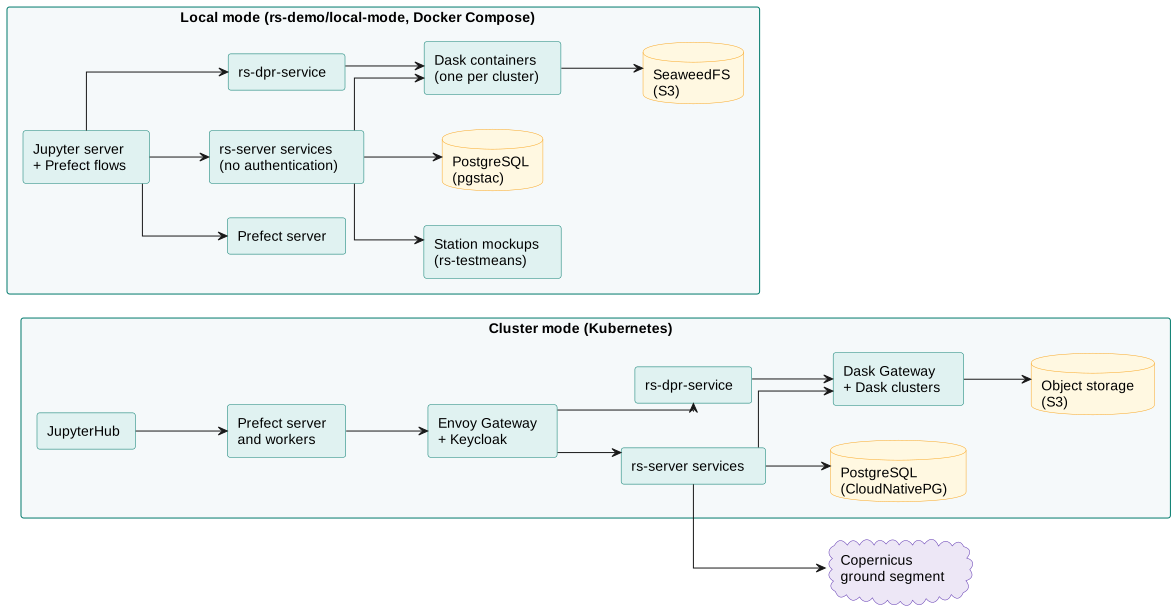
Local mode and cluster mode
RS-Python runs in two modes:
| Local mode | Cluster mode | |
|---|---|---|
| Purpose | Development and tests, on your computer. | Integration, validation and operations. |
| Deployment | Docker Compose file of rs-demo. | Kubernetes cluster, see Deploy RS-Python. |
| Authentication | None: all the users have all the rights. | Keycloak, API keys. |
| External data sources | Mockups from rs-testmeans. | Real stations (and mockups on test platforms). |
| Object storage | SeaweedFS container. | Cloud provider object storage. |
| Dask | One container per Dask cluster, each one running its own Dask Gateway server. | One Dask Gateway, Dask clusters created on demand. |
| Prefect | A Prefect server and one worker container per work pool. | A Prefect server per user group, with workers and work pools. |
| Jupyter | A Jupyter server container. | JupyterHub, one session per user. |
| Gateway | An nginx container that exposes the services on http://localhost. | Envoy Gateway, with a domain name and TLS certificates. |