Infrastructure installation
This guide creates the Kubernetes cluster of an RS-Python platform and deploys the core infrastructure on it. It is
the first step of the deployment of RS-Python,
that also describes the deployment mechanism (packages of applications, inventory, apps.yaml playbook) and the
next steps.
Overview
The infrastructure is created with Terraform on an
OpenStack-based public cloud (the Terraform code of roles/terraform targets
OVHcloud), then configured with Ansible:
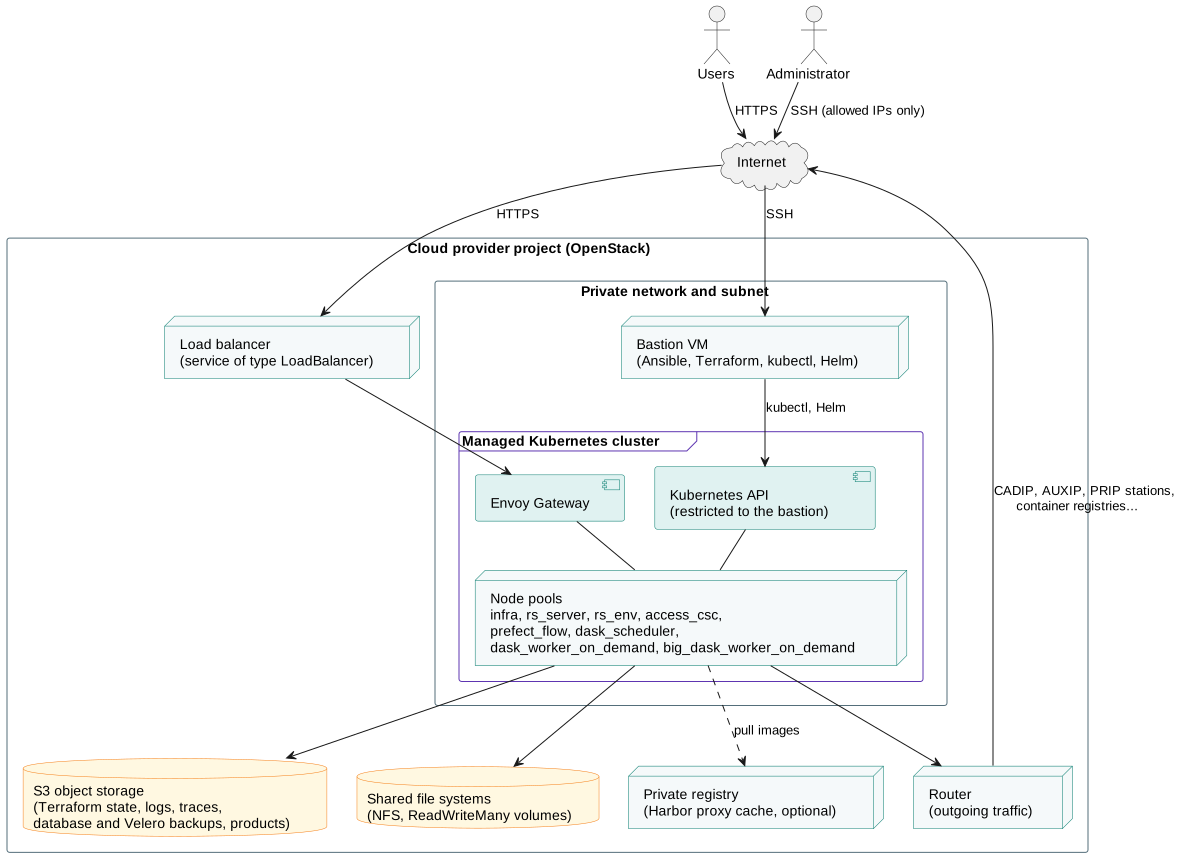
| Resource | Description |
|---|---|
| Private network | A private network, subnet and router. The router gives the outgoing Internet access to the cluster nodes, e.g. to reach the stations and the container registries. |
| Bastion | A virtual machine, reachable with SSH from a list of allowed IP addresses only (allowed_ip_list), used by the administrators to deploy and operate the platform. The Kubernetes API is only reachable from the bastion (or with remote kubectl through Keycloak). |
| Kubernetes cluster | A managed Kubernetes cluster, with one node pool per kind of workload (see node pools), each one with its size and autoscaling settings. |
| Load balancer | Created by Kubernetes for the Envoy Gateway service: the single entry point of all the web services, in HTTPS. |
| Object storage | S3 buckets for the Terraform state, the logs (Loki), the traces (Tempo), the database backups and the Velero backups. The buckets of the products are configured in rs-server-deployment. |
| Shared file systems | OpenStack Manila NFS shares, for the ReadWriteMany volumes, see Enable ReadWriteMany volumes. |
| Private registry (optional) | A Harbor registry used as a proxy cache of the public container registries. |
The core applications deployed on the cluster by this repository are in the apps folder:
| Applications | Role |
|---|---|
00-crds-* |
The Kubernetes custom resource definitions of the operators. |
00-namespaces, 00-storage-class, 00-secret-private-registry |
The namespaces, storage classes and container registry credentials. |
01-cert-manager, 02-cluster-issuer |
cert-manager, that creates the TLS certificates with Let's Encrypt. |
01-csi-driver-nfs, 01-openstack-manila-csi |
The CSI drivers for the shared file systems. |
02-envoy-gateway, 03-listenersets |
Envoy Gateway, the implementation of the Kubernetes Gateway API, see Exposing applications with Gateway API. |
02-plugin-cloudnative-pg, 03-cloudnative-pg |
CloudNativePG, the PostgreSQL operator used by all the databases, with their backups in the object storage, see Restore a database. |
03-keycloak-operator, 04-keycloak-db, 05-keycloak |
Keycloak, the identity and access management, with its database and its realm, see Keycloak realm export and import. |
04-kubectl-oidc |
The OpenID Connect authentication of kubectl with Keycloak, see Remote kubectl. |
02-ds-fanotify |
A daemon set that raises the fanotify limits of the nodes. |
velero |
Velero, the backup and restore of the Kubernetes resources and volumes, see Velero backup and restore. |
The security components (intrusion detection, container security) are deployed on top of this infrastructure from a non-public repository.
Requirements
The installation is run from an administrator machine, then from the bastion. It needs:
- git and jq,
- Miniforge, to install the other tools: Ansible, Terraform, the OpenStack CLI, Helm and kubectl,
- an account on the cloud provider, with its OpenStack credentials (
openrc.shfile) and its API credentials, - an S3 bucket for the Terraform state,
- a domain name, whose DNS records you can edit,
- optionally, a HashiCorp Vault instance to store the credentials, see Credentials management.
Installation
1. Get the rs-infra-core repository
2. Install the tools
# Install Miniforge
mkdir -p ~/miniforge3
wget "https://github.com/conda-forge/miniforge/releases/latest/download/Miniforge3-$(uname)-$(uname -m).sh" -O ~/miniforge3/miniforge.sh
bash ~/miniforge3/miniforge.sh -b -u -p ~/miniforge3
rm -f ~/miniforge3/miniforge.sh

# Initialise conda for your shell (bash or zsh)
~/miniforge3/bin/conda init bash

# Create the "rspy" environment with a recent Python version and activate it
conda create -y -n rspy python=3.13
conda activate rspy

# Install Ansible, Terraform, the OpenStack CLI, Helm, kubectl and their Python dependencies
conda install -y -c conda-forge "ansible<12" terraform python-openstackclient passlib boto3 kubernetes-helm kubernetes-client python-kubernetes
ansible-galaxy collection install kubernetes.core openstack.cloud amazon.aws
3. Create your inventory
The inventory contains the configuration and the credentials of your platform. Create it from the sample inventory, and keep it in a private place (private repository, secret manager...):
cp -rfp inventory/sample inventory/mycluster
cp -rfp inventory/mycluster/.env.template inventory/mycluster/.env
cp -rfp inventory/mycluster/openrc.sh.template inventory/mycluster/openrc.sh
Then edit its files:
| File | Content |
|---|---|
.env |
The API credentials of the cloud provider, and the credentials of the S3 bucket of the Terraform state. |
openrc.sh |
The OpenStack credentials and region. |
backend.tfvars |
The S3 bucket of the Terraform state. |
cluster.tfvars |
The cluster name and region, the IP addresses allowed to reach the bastion (allowed_ip_list), the size and autoscaling of the node pools, the buckets to create, and optionally a Docker Hub account. |
hosts.yaml |
The path of the Python interpreter of the rspy conda environment (ansible_python_interpreter). |
host_vars/setup/main.yaml |
The domain name, the cluster name, the certificate issuer, the S3 endpoint and credentials, the optional HashiCorp Vault. |
host_vars/setup/apps.yml |
The parameters of all the applications of all the repositories: namespaces, sub-domains, versions, resources, credentials... |
The parameters of host_vars/setup/apps.yml are templated by the generate_inventory.yaml playbook, that generates
the random credentials once for all, see Credentials management. To change the parameters
of a running platform, see
Update the infrastructure.
4. Deploy the private registry (optional)
The private Harbor registry is a proxy cache of the public container registries, that avoids pulling the same images many times from them:
To use it, add -e private_registry=true to the apps.yaml commands below.
5. Generate the inventory
6. Create the cluster
This playbook creates an SSH key (inventory/mycluster/privatekey.pem) if needed, the Terraform state bucket, then
all the cloud resources with Terraform, configures the shared file systems credentials, copies the working
directory (repository and inventory) and the kubeconfig file to the bastion, and installs the administration tools
on it (kubectl, Helm, Kustomize, yq...). See Cluster management to work with the Terraform state afterwards.
7. Deploy the core applications
Connect to the bastion and go to the rs-infra-core directory:
Deploy the applications of this repository:
Options of the apps.yaml playbook:
-e private_registry=trueto pull the images through the private registry (disabled by default),-e app=<name>to deploy a single application, e.g.-e app=keycloakfor05-keycloak,-e crd_wait_timeout=30to change the wait timeout of theCustomResourceDefinitionresources, in seconds,-e job_wait_timeout=180for theJobresources,-e custom_wait_timeout=180for theCertificate,Cluster,ClusterIssuer,KeycloakandKeycloakRealmImportresources,-e native_wait_timeout=360for thePod,Deployment,StatefulSetandDaemonSetresources.
Note: configure your domain name (and its sub-domains) to point to the external IP address of the Envoy Gateway load balancer:
kubectl -n envoy-gateway get svc -l app.kubernetes.io/component=proxy.
8. Deploy the other layers
The other layers of RS-Python are deployed with the same apps.yaml playbook, from the bastion, with the
package_paths variable:
cd ~
git clone https://github.com/RS-PYTHON/rs-infra-monitoring.git
git clone https://github.com/RS-PYTHON/rs-workflow-env.git
git clone https://github.com/RS-PYTHON/rs-server-deployment.git
git clone https://github.com/RS-PYTHON/rs-workflow-deployment.git
cd ~/rs-infra-core

ansible-playbook apps.yaml -i inventory/mycluster/hosts.yaml -e '{"package_paths": ["~/rs-infra-monitoring/apps/"]}'
ansible-playbook apps.yaml -i inventory/mycluster/hosts.yaml -e '{"package_paths": ["~/rs-workflow-env/apps/"]}'
ansible-playbook apps.yaml -i inventory/mycluster/hosts.yaml -e '{"package_paths": ["~/rs-server-deployment/apps/"]}'
ansible-playbook apps.yaml -i inventory/mycluster/hosts.yaml -e '{"package_paths": ["~/rs-workflow-deployment/apps/"]}'
The order of the layers, and the actions to do between them, are described in Deploy RS-Python. In particular, after the deployment of rs-workflow-env:
- the Dask clusters are authenticated with JupyterHub: generate a JupyterHub API token and set it in the configuration of the services that use Dask, see Dask Gateway,
- optionally, limit the number of concurrent flow runs, see Prefect work pools concurrency limit.
Operations
| How-to | Description |
|---|---|
| Cluster management | Work with the Terraform state of the cluster. |
| Start and stop the cluster | Scale down the node pools to zero, and back. |
| Credentials management | Generate, set, reuse and back up the credentials of the inventory. |
| Remote kubectl | Administrate the cluster from your computer, with the Keycloak authentication. |
| Remove applications | Remove a deployed application. |
| Exposing applications with Gateway API | Expose a web application with Envoy Gateway. |
| GitHub Container Registry | Pull private images from the GitHub Container Registry. |
| Enable ReadWriteMany volumes | Configure the shared file systems. |
| Isolation between user groups | Deploy several isolated virtual environments on the same cluster. |
| Dask Gateway | Connect to Dask Gateway and manage the Dask clusters. |
| Prefect work pools concurrency limit | Limit the number of concurrent flow runs. |
| Keycloak realm export and import | Copy a Keycloak realm between platforms. |
| Restore a database | Restore a PostgreSQL database from its backups. |
| Velero backup and restore | Back up and restore Kubernetes resources. |