Staging internals
This page describes how the staging is implemented by rs-server-staging.
Two Docker images
The staging uses two different Docker images, both built by the rs-server CI:
| Image | Role | Deployment |
|---|---|---|
rs-server-staging |
The web service: OGC API - Processes endpoints implemented with pygeoapi, jobs stored in a PostgreSQL database, orchestration of the staging tasks. | A Kubernetes deployment, with the other rs-server services. |
dask/staging/k8s (dask/staging/local in local mode) |
The Dask scheduler and workers that execute the copy tasks. They contain the rs_server_staging and rs_server_common packages, so the workers can run their functions. |
A Dask cluster created through Dask Gateway, labelled dask-staging, kept running by the dask-cluster-staging application of rs-server-deployment. |
The web service is the client of the Dask cluster: it connects to the cluster through Dask Gateway (with a JupyterHub API token), then submits the tasks to the scheduler, that distributes them to the workers. The Python and Dask versions of the service and of the Dask images must be the same (see Dask images).
flowchart LR
    flow["Prefect flow<br/>(stage-cadip, stage-aux...)"]
    subgraph rsserver["rs-server-staging pod"]
        api["OGC API - Processes<br/>(pygeoapi)"]
        job["Staging job<br/>(processor)"]
    end
    db[("PostgreSQL<br/>jobs")]
    catalog["rs-server-catalog"]
    gateway["Dask Gateway"]
    subgraph dask["Dask cluster dask-staging (dask/staging/k8s image)"]
        scheduler["Scheduler"]
        w1["Worker"]
        w2["Worker"]
    end
    station["External station<br/>(CADIP, AUXIP, PRIP...)"]
    s3[("Object storage")]
    flow -- "POST /processes/staging/execution<br/>GET /jobs/{id}" --> api
    api --> job
    job --> db
    job -- "search existing items,<br/>publish new items" --> catalog
    job -- "connect" --> gateway
    job -- "submit tasks" --> scheduler
    scheduler --> w1
    scheduler --> w2
    w1 -- "HTTP GET (OAuth2 token)" --> station
    w1 -- "stream upload" --> s3
    w2 -- "HTTP GET" --> station
w2 -- "stream upload" --> s3Sequence
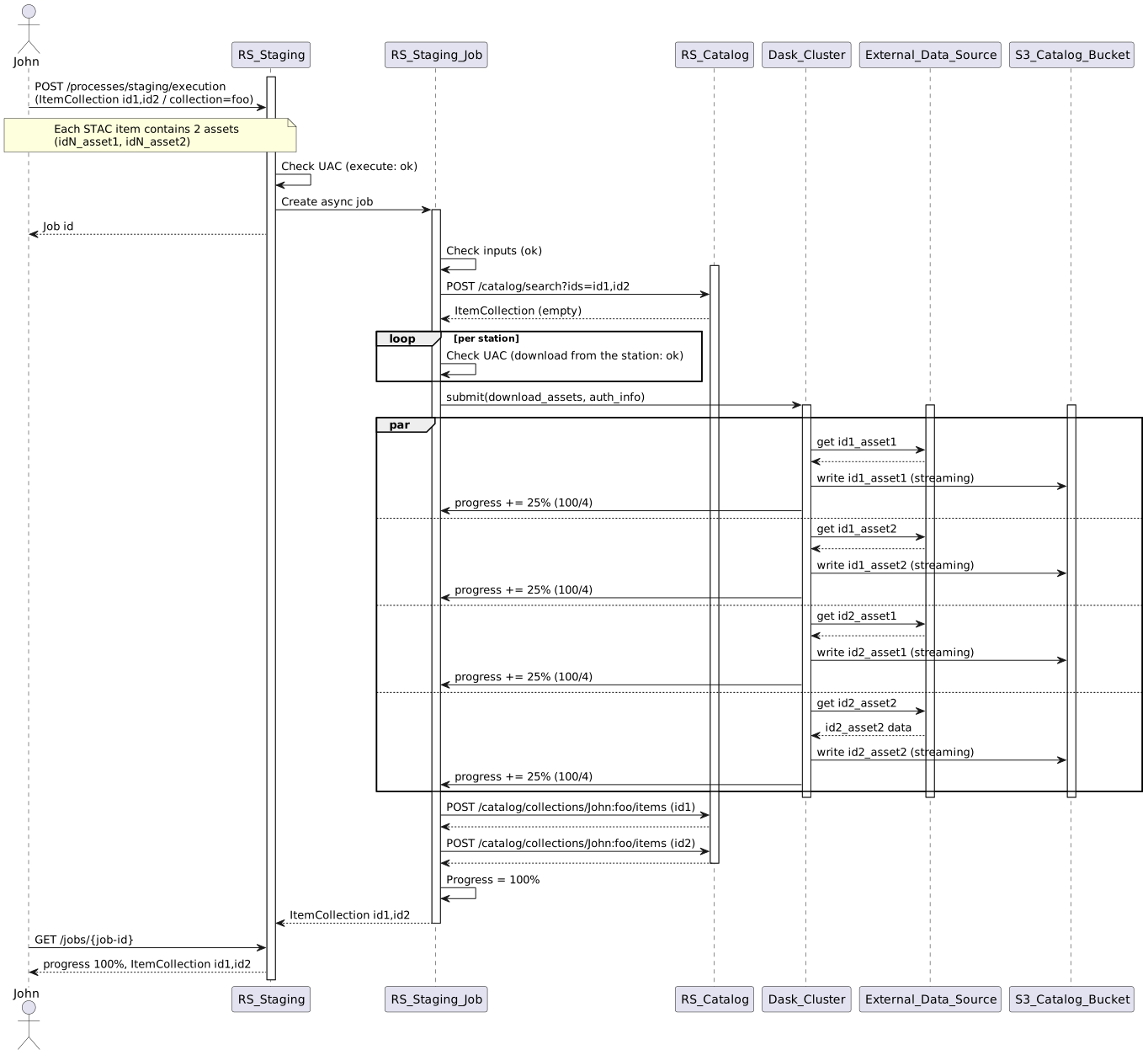
- The service checks the
executeright of the user, creates a job in the database and returns its identifier. The rest of the processing is asynchronous. - The job resolves the input items (from the request body, or by calling the given URL), searches the catalog to find the items that are already staged, and keeps the others (or the expired ones).
- For each station, it checks the
staging_downloadright of the user, loads the station configuration, and gets an OAuth2 token, refreshed automatically during the job. - It computes the target bucket and path of each asset (
s3://<bucket>/<owner>/<collection>/...) from the bucket configuration. - It connects to the Dask cluster and submits one task per asset: each task streams the file from the station to the object storage, and reports its progress.
- When all the tasks are completed, it publishes the items in the catalog, with their assets referencing the object storage, and updates the job status. If a task fails, the job fails and the files already copied are deleted.
The OpenTelemetry trace context is propagated to the Dask tasks, so the whole staging can be followed in Grafana.
Local mode
In local mode, there is no Dask Gateway in the cluster: the dask/staging/local image runs its own Dask Gateway
server, and the service connects to it with a basic authentication (see
Dask images).