rs-client-libraries
rs-client-libraries is the Python library of RS-Python for the users and the flow developers. It contains three packages:
| Package | Content | Documentation |
|---|---|---|
rs_client |
Clients to call the RS-Python services: external data sources, catalog, staging, DPR processing, OSAM. | This page, Create a custom flow |
rs_workflows |
The Prefect flows delivered with RS-Python: search, staging, processing, operations. | Prefect flows |
rs_common |
Common utilities: logging, OpenTelemetry instrumentation, Prefect blocks, S3 access, model classes and enums. | Python API documentation |
| Link | |
|---|---|
| Source code | https://github.com/RS-PYTHON/rs-client-libraries |
| Python package | https://pypi.org/project/rs-client-libraries/ |
| Python API documentation | rs_client, rs_common and rs_workflows modules of the Python API documentation |
Installation
There are two ways to use the library:
- From your JupyterHub session on the platform, where the latest version is already installed, with the environment variables needed to call the services.
-
In your own Python environment:
pip install rs-client-libraries
opentelemetry-bootstrap -a install  # install the OpenTelemetry instrumentation of the dependencies
Then set the
RSPY_WEBSITEenvironment variable to the URL of the services, e.g.https://rspy.ops.rs-python.eu, andRSPY_APIKEYto your API key.
Architecture of rs_client
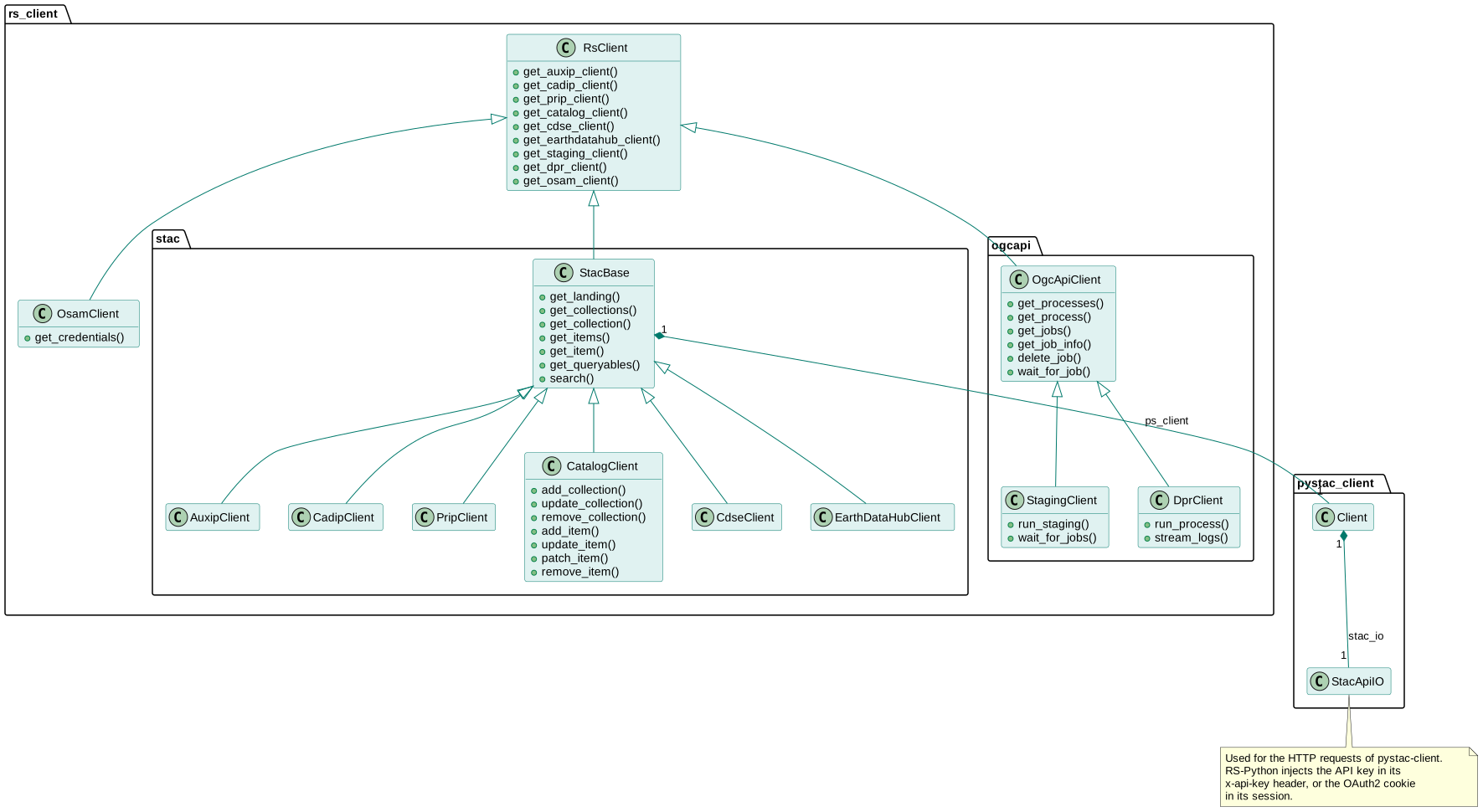
- RsClient is the base class. It holds the URL of the services, the authentication information (API key, or
OAuth2 session cookie read from the
RSPY_OAUTH2_COOKIEenvironment variable) and the owner identifier used for the catalog. It creates the instances of the child classes with the same attributes:get_cadip_client(),get_catalog_client()... - StacBase and its child classes call the STAC APIs. They wrap
a pystac-client
Client, whoseStacApiIOinstance sends the HTTP requests with the API key in thex-api-keyheader. They add error handling and caching to pystac-client:- CadipClient, AuxipClient and PripClient call the external data sources,
- CatalogClient calls the catalog and adds the write operations (collections and items creation, update, deletion) that pystac-client doesn't provide,
- CdseClient and EarthDataHubClient call the public STAC APIs of the Copernicus Data Space Ecosystem and of the Destination Earth EarthDataHub.
- OgcApiClient and its child classes call the OGC API - Processes
services, and validate the requests and responses with the OGC schemas:
- StagingClient calls the staging,
- DprClient calls the DPR processing service.
- OsamClient gets your object storage credentials from OSAM.
In local mode (RSPY_LOCAL_MODE=1), no authentication is needed and the URL of each service is read from the
RSPY_HOST_<SERVICE> environment variables.
Examples
import os
from rs_client.rs_client import RsClient

# The API key is mandatory in cluster mode. Use the OAuth2 cookie only from interactive notebooks,
# because it has a short lifespan.
rs_client = RsClient(
    rs_server_href=os.environ["RSPY_WEBSITE"],
    rs_server_api_key=os.environ["RSPY_APIKEY"],
    owner_id=None,  # default: the owner of the API key
)

# Search the sessions of a CADIP station
cadip_client = rs_client.get_cadip_client()
for collection in cadip_client.get_collections():
    print(collection.id)
sessions = cadip_client.search(collections=["sgs"], timestamp="2026-08-07T00:00:00Z/2026-08-08T00:00:00Z")

# Stage them into one of your catalog collections, and wait for the jobs to finish
staging_client = rs_client.get_staging_client()
jobs = staging_client.run_staging(sessions.to_dict(), "my-sessions")
staging_client.wait_for_jobs(jobs)

# Read your catalog collection
catalog_client = rs_client.get_catalog_client()
items = list(catalog_client.get_items("my-sessions"))

# Get your object storage credentials
credentials = await rs_client.get_osam_client().get_credentials()
More examples are given in Create a custom flow, in Browse products, and in the rs-demo notebooks.